
Every agile team has lived through this moment: the sprint board looks perfectly on track, every card is moving left to right, and then two days before the deadline, half the team is scrambling and the sprint goal quietly gets downgraded to "we'll finish it next sprint." If that sounds familiar, the problem usually isn't your team's effort — it's a gap in how sprints are planned, tracked, and understood in the first place.
Sprints are one of the most widely used frameworks in modern software and product development, but they're also one of the most misunderstood. Teams adopt the ritual — the two-week cycle, the standup, the retro — without always understanding why each type of sprint exists, what makes one succeed where another fails, or how to actually track progress in a way that reflects reality instead of just ticket status.
This guide breaks down what sprints are, the different types you'll encounter, why they matter more than most teams realize, and how to track them properly — including the blind spot most tracking methods miss entirely.
What Is a Sprint, Exactly?
A sprint is a fixed, time-boxed period — typically one to four weeks — during which a team commits to completing a specific set of work. It's the core building block of Scrum and most agile methodologies, designed to break large, uncertain projects into small, predictable, reviewable chunks.
The idea behind sprints is simple: instead of planning a six-month project in one shot and hoping the plan survives contact with reality, teams plan in short bursts, deliver something tangible at the end of each burst, and adjust based on what they learn. This is what makes agile "agile" — the ability to course-correct every couple of weeks instead of discovering a problem six months in.
A typical sprint includes:
- Sprint planning – the team decides what will be tackled in the upcoming sprint
- Daily standups – short check-ins to surface blockers and progress
- Development/execution – the actual work of building, testing, or completing tasks
- Sprint review – demonstrating completed work to stakeholders
- Sprint retrospective – reflecting on what went well and what didn't, to improve the next cycle
Simple in structure. Much harder to execute well — which is why so many teams run sprints for years without ever getting them right.
Why Sprints Matter
It's easy to treat sprints as just a scheduling ritual, but they solve real, expensive problems when done properly.
They create predictability out of uncertainty. Software and product work is inherently unpredictable — requirements shift, technical surprises appear, priorities change. Sprints don't eliminate that uncertainty, but they contain it into short, manageable windows where the cost of being wrong is measured in days, not months.
They force prioritization. A sprint has a fixed capacity. That constraint forces teams and stakeholders to have the prioritization conversation early — what actually matters most right now — rather than trying to do everything at once and finishing nothing.
They create fast feedback loops. Instead of building for months before anyone sees the result, sprints put working output in front of stakeholders every couple of weeks. Problems get caught early, when they're cheap to fix, instead of late, when they're expensive.
They surface team health, not just project status. A well-run sprint retrospective reveals whether the team is overloaded, blocked, or misaligned — information that's much harder to see in longer project cycles where problems can hide for months.
They build a rhythm. Consistent sprint cadence creates a predictable operating rhythm for the whole organization — stakeholders know when to expect updates, teams know when to expect feedback, and planning becomes a repeatable process instead of a one-off event.
The catch is that all of these benefits depend entirely on how well the sprint is planned and tracked. A poorly tracked sprint delivers none of this — it just becomes a two-week countdown to the same scramble, on repeat.
The Main Types of Sprints
Not every sprint looks the same, and understanding the different types helps teams choose the right structure for the right situation.
1. Standard Development Sprints
The most common type — a fixed-length cycle (usually one or two weeks) focused on building and shipping a defined set of features or fixes. This is the default sprint most teams think of when they hear the word.
2. Design Sprints
Popularized by Google Ventures, a design sprint is a short, intensive process (often just five days) focused on solving a specific problem through rapid prototyping and testing, rather than building production-ready code. It's used to validate ideas before committing engineering time to them.
3. Bug-Fix or Stabilization Sprints
Sometimes teams dedicate an entire sprint purely to fixing bugs, paying down technical debt, or stabilizing a release, with no new feature work. These are essential for long-term codebase health but are often the first thing skipped when deadlines get tight — usually to the team's detriment later.
4. Spike Sprints
A "spike" is a time-boxed research or investigation effort used when the team doesn't yet know enough to estimate or plan real development work. A spike sprint is dedicated to answering a technical or product question — for example, evaluating whether a new API can support a planned feature — before committing to a full build sprint.
5. Release Sprints
Focused specifically on final testing, documentation, deployment prep, and release-readiness tasks rather than new feature development. Common in teams that ship on a fixed release cadence rather than continuously.
6. Zero Sprints (Sprint 0)
Used at the very start of a new project, a "Sprint 0" focuses on setup — environment configuration, initial backlog creation, defining the team's working agreements — rather than shippable output. It's not always necessary, but it prevents teams from starting a real sprint before the basic groundwork is in place.
7. Innovation or Hackathon Sprints
Some teams periodically run sprints (or partial sprints) dedicated to experimentation — exploring new ideas, tools, or approaches outside the regular backlog. These are less about immediate output and more about long-term learning and morale.
Choosing the right type of sprint for the right moment — rather than defaulting to a standard development sprint every single time — is one of the most underused levers teams have for improving both delivery and team health.
How to Track Sprints Effectively
This is where most teams lose the thread. Tracking a sprint well means more than watching a Kanban board move from "To Do" to "Done." Here's what effective sprint tracking actually requires.
1. Track Velocity, Not Just Completion
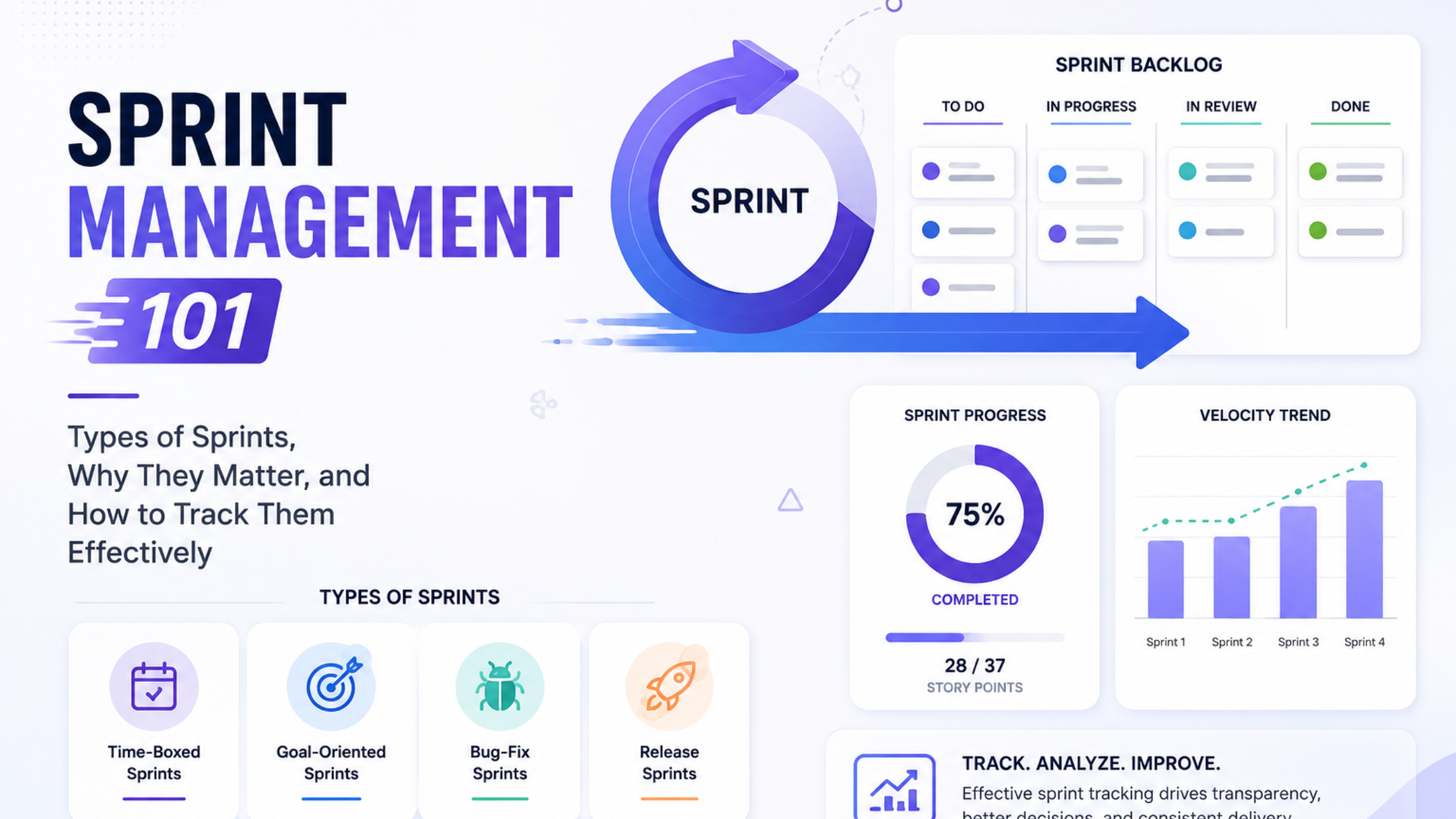
Velocity — how much work a team completes per sprint, typically measured in story points — is the foundation of realistic planning. Tracking velocity over multiple sprints (not just one) reveals the team's true, sustainable capacity, rather than a single lucky or unlucky cycle.
2. Watch Burndown, Not Just the Final Result
A burndown chart shows how much work remains over the course of the sprint. A sprint that finishes on time but shows a burndown chart that flatlines for the first week and crashes in the last two days isn't actually healthy — it's a sign of poor daily pacing, even if the outcome looked fine on paper.
3. Track Scope Changes Mid-Sprint
Scope creep during an active sprint is one of the most common causes of missed sprint goals. Tracking how often new work gets added mid-sprint — and how much — helps teams identify whether the problem is estimation, discipline, or stakeholder pressure.
4. Monitor Blockers and Their Duration
It's not enough to know a ticket was blocked — teams need to track how long tickets stay blocked and why. Recurring blocker patterns (waiting on another team, unclear requirements, environment issues) point to systemic fixes that a single sprint retro often misses.
5. Measure What Happens After the Board, Not Just On It
This is the blind spot almost every sprint-tracking method misses: task boards show status, not effort. A ticket sitting in "In Progress" for three days could mean someone is deeply focused and making steady progress — or it could mean they're stuck in meetings, context-switching across five other tickets, or quietly overloaded. The board can't tell the difference, and that gap is exactly where sprint estimates go wrong.
This is where workforce analytics platforms like We360.ai add a layer that traditional sprint tools can't. While Jira, Trello, or Asana show what's planned and what's marked done, We360.ai shows how the actual working time behind those tickets is being spent — time spent in focused work versus fragmented across tools, workload distribution across the team during the sprint, and whether certain team members are quietly absorbing more of the sprint's real effort than the board reflects. Paired together, task boards and workforce analytics answer both halves of the sprint-tracking question: what got done, and what it actually took to get it done.
6. Run Retrospectives That Use Data, Not Just Memory
Most retrospectives rely on what people remember feeling during the sprint — which is useful, but incomplete and often biased toward whatever happened most recently. Bringing in objective data (velocity trends, blocker durations, workload distribution) alongside team input turns the retro into a genuinely diagnostic conversation instead of a vibes-based one.
Common Sprint Tracking Mistakes to Avoid
- Treating story points as a productivity score. Story points estimate effort, not performance. Comparing individuals by points completed encourages gaming the estimate, not better delivery.
- Ignoring velocity variance. A single great or terrible sprint doesn't tell you much. Look at trends across at least three to five sprints before drawing conclusions.
- Skipping stabilization sprints under deadline pressure. Deferring bug fixes and technical debt repeatedly compounds into larger, more expensive problems later.
- Only tracking output, never workload. A team that consistently "hits" its sprint goals by working unsustainable hours will eventually show up as attrition — long after the sprint board looked fine.
- Letting scope creep go untracked. If nobody's logging mid-sprint scope changes, the team will keep blaming "bad estimates" for a problem that's actually about discipline and stakeholder management.
The Real Reason Your Sprint Estimates Are Always Wrong
Most teams respond to a blown estimate by tweaking the estimation process itself — bigger buffers, different point scales, more granular tickets. Rarely does it help for long, because the estimate usually wasn't wrong about the work. It was wrong about how much uninterrupted time the team would actually have to do that work.
A five-point ticket estimated at "roughly a day and a half of focused work" doesn't account for the two hours lost to unplanned meetings, the twenty minutes spent re-orienting after each Slack interruption, or the three other tickets someone was quietly context-switching between because a manager asked for "just a quick update" on each. None of that shows up in story points. None of it shows up on the sprint board either — the ticket just sits in "In Progress" a little longer than planned, and the retro chalks it up to "estimation was off," when the estimate was actually a reasonable guess about the work and a blind guess about the conditions the work would happen under.
This is why the same team, with the same skill level, can estimate wildly differently across two sprints. It's rarely about the complexity of the tickets — it's about how much of the sprint's actual working hours got eaten by meetings, app-switching, ad hoc requests, and multitasking that nobody tracked because none of the standard sprint tools are built to see it. Story points measure effort in a vacuum; they say nothing about how fragmented that effort ends up being once the sprint actually starts.
This is exactly the gap workforce analytics closes. By surfacing how much of the sprint's real time went to focused, uninterrupted work versus meetings, tool-switching, and fragmented multitasking, a platform like We360.ai gives teams the missing variable in their estimation model. Instead of treating every blown estimate as a story-point miscalculation, teams can see whether the real issue was, for example, that engineers only got 60% of their calendar as actual focus time that sprint — which explains far more about a missed deadline than any planning poker session ever will.
How Long Should a Sprint Be?
One question every team eventually asks: one week, two weeks, three weeks, or four? There's no universal answer, but a few patterns hold up across most teams.
One-week sprints work well for fast-moving product teams with well-understood, small-scope work — think mature SaaS products doing continuous iteration. The tight cycle forces small, well-defined tasks and gives very fast feedback, but it leaves little room for anything unexpected and can feel exhausting if planning overhead isn't kept lean.
Two-week sprints are the most common choice industry-wide, and for good reason — they're long enough to absorb minor surprises and complete meaningfully sized work, but short enough to keep feedback loops tight and prevent scope from ballooning out of control.
Three-to-four-week sprints suit teams working on more complex, less predictable work — research-heavy projects, teams coordinating across multiple dependencies, or organizations still building estimation discipline. The tradeoff is slower feedback and a higher risk that problems go unnoticed for longer before the sprint review surfaces them.
The right length isn't about copying what another company does — it's about matching the cycle to how predictable your work actually is, and adjusting based on what velocity and retro data tell you over several cycles.
Frequently Asked Questions About Sprints
How many sprints should a project have before results are meaningful? Most teams need at least three to five sprints before velocity and burndown data become genuinely reliable. Early sprints in any new team or project tend to be noisy simply because estimation calibration takes time.
Should every team member work on tasks in every sprint? Not necessarily. Some roles — QA, design, DevOps — may work slightly out of phase with the core development sprint, picking up work as it becomes ready rather than starting at the same moment as everyone else. Forcing perfect synchronization across every role often creates artificial bottlenecks.
What's the difference between a sprint goal and a sprint backlog? A sprint goal is the single, high-level outcome the sprint is meant to achieve — the "why." The sprint backlog is the specific list of tasks and tickets committed to achieving that goal — the "what." Teams that only track the backlog and never state a clear goal often finish a sprint having completed a list of tickets that don't add up to anything meaningful.
Is it normal for sprint velocity to fluctuate? Yes, to a degree — holidays, onboarding new team members, and unusually complex tickets all cause natural variance. What matters is the trend over time, not any single sprint's number. A sustained downward trend, however, is usually a signal worth investigating rather than ignoring.
Can sprints work for non-engineering teams? Absolutely. Marketing, content, and design teams increasingly use sprint structures to plan campaigns, content calendars, and creative work in fixed cycles. The core principles — time-boxing, prioritization, and retrospectives — apply well beyond software development.
Bringing It All Together
Sprints work because they turn big, uncertain projects into small, learnable cycles — but only when teams track the right things. Velocity, burndown, blockers, and scope changes tell you what happened on the board. Workforce analytics tells you what it actually took to get there — where time went, how evenly work was distributed, and whether the team's pace is sustainable or quietly heading toward burnout.
Teams that combine both views stop treating sprint estimates as guesswork and start treating them as a genuinely improvable process — one sprint at a time.
Choosing the right type of sprint for the situation, tracking the metrics that actually predict problems, and pairing task-level visibility with real workforce data is what separates teams that consistently hit their goals from teams that are always, mysteriously, running two days behind. The board tells you the story you want to see. The data behind it tells you the one you need to know.