
Software costs are rising, yet many businesses still don’t have a clear view of how their tools are actually used. Licenses go underutilized, teams juggle overlapping apps, and decisions are often based on assumptions rather than data.
That’s where software usage tracking comes in.
At its core, software usage tracking helps businesses understand which tools employees use, how often they use them, and whether those tools truly add value. Instead of guessing, companies can rely on real insights to optimize their tech stack, reduce waste, and improve productivity.
As organizations continue to adopt more digital tools, having this level of visibility is no longer optional. It’s a practical way to stay efficient, control costs, and ensure every piece of software serves a real purpose.
What is Software Usage Tracking?
Software usage tracking is the process of monitoring and analyzing how employees interact with the applications and tools provided by an organization. It captures data such as which software is being used, how frequently it’s accessed, and how much time is spent on each tool.
This goes beyond simply knowing what’s installed on company systems. It helps businesses understand actual usage patterns. For example, a team might have access to multiple project management tools, but tracking can reveal which ones are actually being used and which are being ignored.
Modern software usage tracking is typically done through automated tools that collect real-time data without disrupting workflows. These tools present insights through dashboards and reports, making it easier for decision-makers to evaluate software performance.
In simple terms, software usage tracking turns everyday tool usage into measurable data, helping businesses make informed, practical decisions about their technology investments.
Related read: 10 Proven Techniques for Mastering Time Management at Work
Why Software Usage Tracking Matters for Businesses
Without clear visibility into software usage, businesses often overspend on tools they don’t fully use. Software usage tracking helps organizations make smarter decisions by showing what’s actually delivering value and what isn’t.
One of the biggest benefits is cost optimization. Companies can quickly identify unused or underused licenses and eliminate them, reducing unnecessary expenses.
At the same time, it helps uncover redundant tools that serve the same purpose, allowing teams to streamline their tech stack.
It also plays a key role in improving productivity. By understanding which tools employees rely on, businesses can remove friction, support better workflows, and ensure teams have what they need to perform efficiently.
If certain tools are underutilized, it may highlight a need for better training or onboarding.
Overall, software usage tracking gives businesses the clarity they need to operate more efficiently, reduce waste, and align their tools with real work patterns.
How Companies Track Software Usage Today
Businesses today rely on two main approaches to track software usage: manual methods and automated tools. The difference between them largely comes down to accuracy, efficiency, and scalability.
Manual methods are the traditional approach. This usually involves surveys, employee self-reporting, or basic check-ins to understand which tools are being used. While simple to implement, these methods have clear limitations.
They depend heavily on memory and honesty, which often leads to incomplete or inaccurate data. On top of that, collecting and analyzing this information takes time, making it difficult to maintain consistently.
In contrast, automated software usage tracking tools provide a much more reliable solution. These tools track usage in real time, capturing precise data on how applications are used across the organization.
There’s no need for manual input, reducing errors and saving time. As a result, businesses get accurate, continuous insights without disrupting daily workflows.
In practice, most growing companies are shifting toward automation because it offers clarity and consistency that manual methods simply can’t match.
Key Features to Look for in Software Usage Tracking Tools
Not all software usage tracking tools deliver the same value. The right tool should go beyond basic tracking and provide insights that are easy to understand and act on.
1. Real-Time Software Usage Monitoring
Real-time tracking allows you to see exactly how software is used in real time. This helps teams respond quickly, whether it’s identifying low adoption or spotting inefficiencies in workflows.
2. Advanced Software Usage Analytics
Raw data alone isn’t enough. Look for tools that turn usage data into meaningful insights, such as usage trends, peak activity times, and tool performance across teams. This makes decision-making much more practical.
3. User-Friendly Dashboard
A clean, intuitive dashboard is essential. If the data is hard to read or navigate, it won’t be used effectively. Good tools present insights in a simple, visual way that anyone can understand.
4. Integration Capabilities
The tool should easily integrate with your existing systems, such as project management software, HR tools, or IT infrastructure. This ensures smoother data flow and reduces extra work.
5. Data Privacy and Compliance
Tracking software usage must be done responsibly. Strong privacy controls, data protection measures, and regulatory compliance are critical to maintaining trust and avoiding legal risks.
6. Scalable Tracking System
As your business grows, your tracking needs will change. A scalable system ensures the tool continues to perform well, whether you have a small team or a large, distributed workforce.
How to Implement Software Usage Tracking (Step-by-Step)
Implementing software usage tracking doesn’t have to be complicated. A structured approach helps you get accurate insights without disrupting your team.
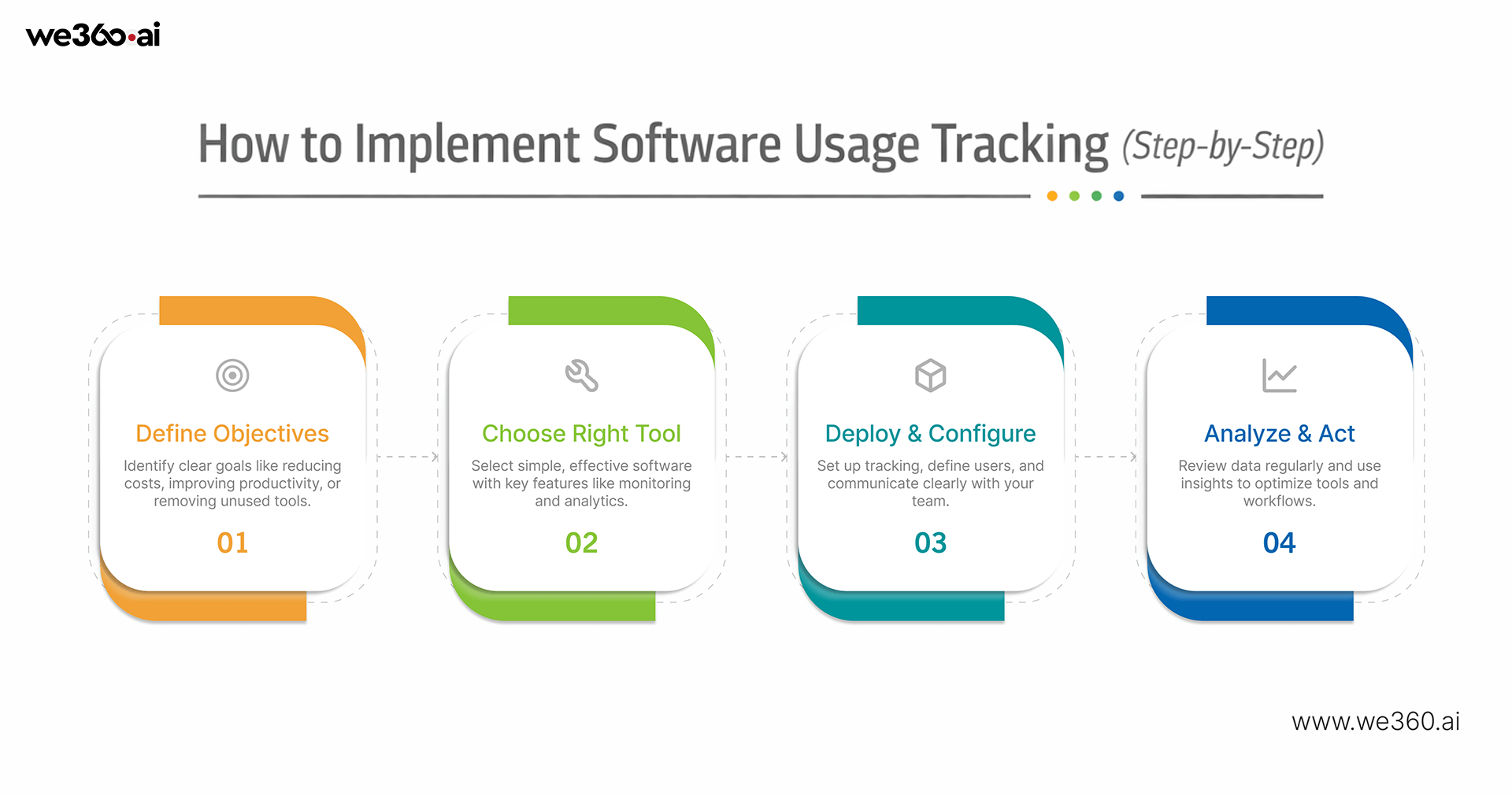
1. Define Your Objectives
Start by identifying what you want to achieve. It could be reducing software costs, improving productivity, or eliminating unused tools. Clear goals help you focus on the right data instead of tracking everything without purpose.
2. Choose the Right Usage Tracking Software
Select a tool that aligns with your needs. Look for features like real-time monitoring, analytics, and ease of use. Avoid overcomplicated solutions that your team may struggle to adopt.
3. Deploy and Configure the Tool
Once selected, roll out the tool across your organization. Set up tracking parameters, define user groups, and ensure everything is configured correctly. It’s also important to communicate transparently with employees about what is being tracked and why.
4. Analyze Data and Take Action
Tracking is only useful if you act on it. Review reports regularly to identify trends, unused tools, or inefficiencies. Use these insights to optimize your software stack, improve workflows, and make better decisions.
How We360.ai Helps You Optimize Software Usage
We360.ai simplifies software usage tracking by turning complex data into clear, actionable insights.
It provides complete visibility into software usage, so you always know which tools are actively used and which are not. This helps eliminate guesswork and gives you full control over your tech stack.
With actionable analytics, the platform doesn’t just show data; it highlights patterns and opportunities. You can quickly identify underused tools, track adoption, and understand how teams interact with different applications.
It also helps improve productivity by showing where time is being spent. Managers can spot inefficiencies and make adjustments to improve workflows.
At the same time, it helps reduce software costs by identifying unused licenses and redundant tools, allowing you to cut unnecessary expenses.
All of this is delivered through a simple, insight-driven dashboard, making it easy for both technical and non-technical users to understand and act on the data.
Conclusion
Software usage tracking has become essential for businesses that want to stay efficient and in control of their technology. When you can clearly see how tools are used, it becomes much easier to cut unnecessary costs, eliminate redundancies, and ensure that every application adds real value.
More importantly, it helps teams work smarter. Instead of relying on assumptions, decisions are backed by actual data. This leads to better workflows, improved productivity, and a cleaner, more focused tech stack.
If you’re looking to get that level of clarity, We360.ai makes the process simple. From real-time visibility to actionable insights, it helps you understand, optimize, and take control of your software usage without added complexity.
Start making smarter software decisions today with We360.ai and turn your usage data into real business impact.